【Android Development for Beginners】Lesson 2B : String Data Type, Combining Strings Together, and Integer Variables
This Notes is according to the udacity free course :
Android Development for Beginners
Lesson 2B : String Data Type, Combining Strings Together and Integer Variables
Finally We cross the river and change the layouts successfully.
But We can do it better by letting the price change automatically but not change after the we click the "order" button.
So this is what we want to do in this class.
In this Class the most important keyword is "STRING"!
Cheers~~~~~~
Write "String" in the Java file can let your app's words time by time whatever you put.
But WHY we need it to change our words, why don't we just change it in the xml file directly?
Example :
Get the phone call or the Newspaper app

so you put the words in your database and hook them up to your string, so the word will change when the action is be triggered.
H.W.

Try to modify by yourself
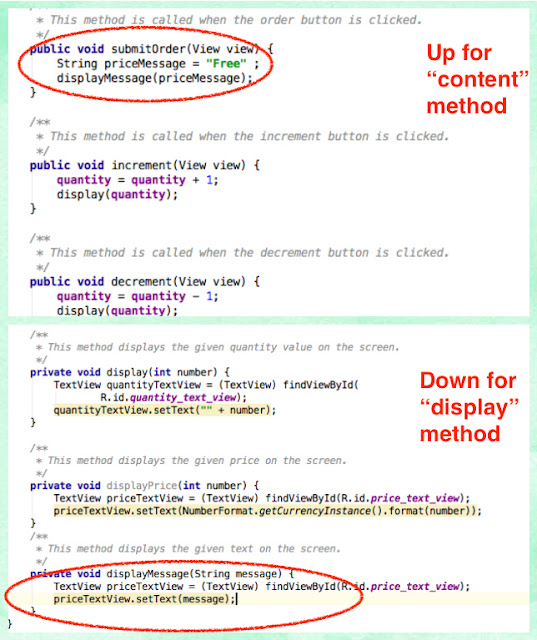
You will find out the word "displayMessage(priceMessage)" will display in red.
Copy the method here, let in can be worked.
Good luck!
Tips:
===========================
Combining String Together
Use a string combination, you can change some parts of your sentence.

How to create a string combination, use a "+" to connect words!

H.W.

H.W 2

====================
How to Let the string sentence shows up in different lines.
Key Point : escape characters <<check out the link inside!
If You have any problem, pls try to figure out by ourselves!!! Bloopepper !!
The Final Project Code :
Android Development for Beginners
Lesson 2B : String Data Type, Combining Strings Together and Integer Variables
Finally We cross the river and change the layouts successfully.
But We can do it better by letting the price change automatically but not change after the we click the "order" button.
So this is what we want to do in this class.
In this Class the most important keyword is "STRING"!
Cheers~~~~~~
Write "String" in the Java file can let your app's words time by time whatever you put.
But WHY we need it to change our words, why don't we just change it in the xml file directly?
Example :
Get the phone call or the Newspaper app

so you put the words in your database and hook them up to your string, so the word will change when the action is be triggered.
H.W.
Try to modify by yourself
You will find out the word "displayMessage(priceMessage)" will display in red.
Copy the method here, let in can be worked.
Good luck!
Tips:

===========================
Combining String Together
Use a string combination, you can change some parts of your sentence.
How to create a string combination, use a "+" to connect words!
H.W.
H.W 2
====================
How to Let the string sentence shows up in different lines.
Key Point : escape characters <<check out the link inside!
If You have any problem, pls try to figure out by ourselves!!! Bloopepper !!
The Final Project Code :
留言
張貼留言